Have you received an email and are unsure about its legitimacy?
Here are several indicators to help you determine whether the email is legitimate or not.
Does the email come from outside the organization (Starfrit) ?
If the email is from an external sender, a banner will appear at the top of the email (See below). This banner helps you quickly identify where the email is coming from.

Do you recognize the sender's address ?
In the example below, you see the name Gilles Gosselin, but notice that the email address is not a Starfrit address (ggosselin@starfrit.com).

So, if you don't recognize the sender's address and/or the content of the email, proceed with a caution. Confirm with your colleagues to see if anyone recognizes the sender, or ask yourself : were you expecting an email from a supplier or customer who could validate the legitimacy of this message ?
If the email appears to be a phishing attempt, here are the actions you should take :
- Right-click on the suspicious email
- Click "Report"
- Then choose whether to report it as Junk or Phishing*
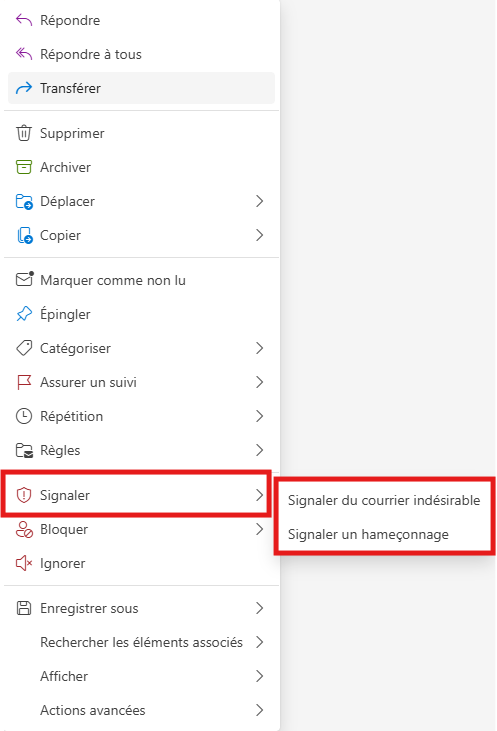
*Difference between Junk and Phishing :
A junk email is unsolicited, often advertising, while a phishing attempt is meant to trick you into sharing confidential information such as password or even money.
Was this article helpful?
That’s Great!
Thank you for your feedback
Sorry! We couldn't be helpful
Thank you for your feedback
Feedback sent
We appreciate your effort and will try to fix the article